
Environment Overview
Applies to: Codeless
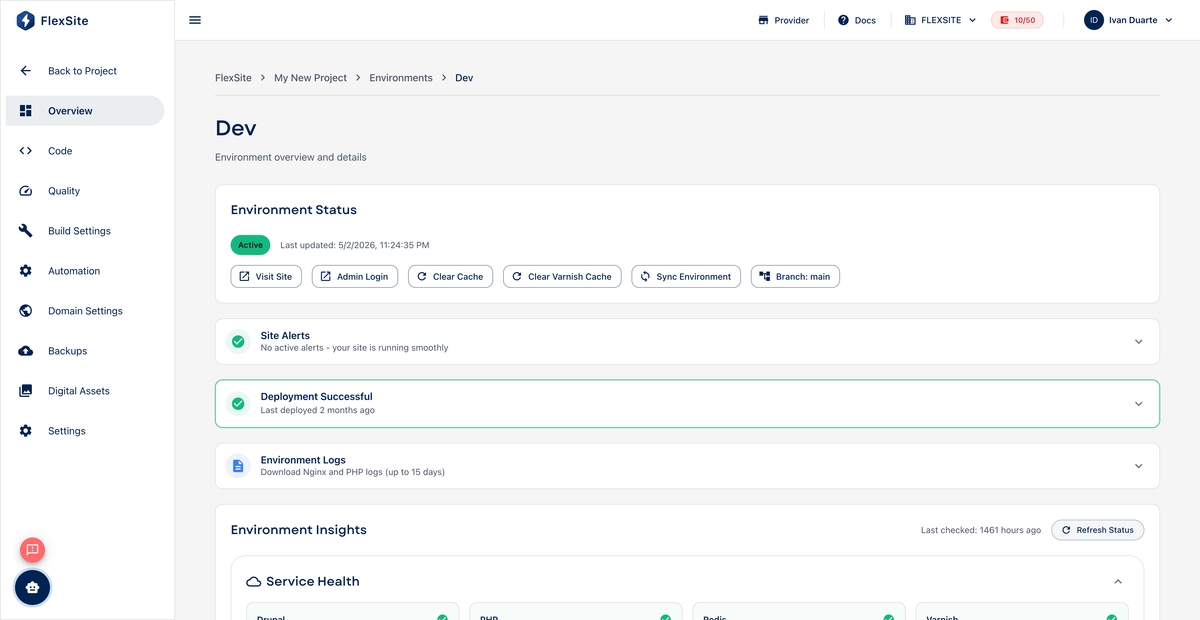
Overview
For Codeless (and FlexLab) projects, an environment is one live copy of the website — often used as “test” before you show changes on “live.” The environment Overview shows whether that copy is healthy and gives you day-to-day actions.
Key concepts
- Hostname — the web address for this environment (a FlexSite URL until you attach a custom domain).
- Sync — copy database content and/or uploaded files from another environment (e.g. copy staging → production). Useful when editors prepared content on a test site.
- Cache — stored copies of pages for speed. Clear caches fixes many “I don’t see my change yet” issues after deploys.
- Quick Login — opens Drupal administration for this environment without a separate password.
Steps — open an environment
- Open Environments in the project sidebar.
- Click the environment name (e.g.
dev,prod). - Review status (ready, provisioning, or error), URL, and recent activity.
Common actions
- Sync Environment — promote content from another environment (may use credits; FlexSite may take a safety backup first).
- Clear caches — refresh page storage after theme or config changes.
- Quick Login — manage content in Drupal.
- Sidebar links: Quality (speed reports), Build Settings (server size), Backups, Domain Settings.
Status indicators
- Ready — safe to edit, sync, or attach domains.
- Provisioning — FlexSite is still building; wait before syncing or going live.
- Error — read advisories on the card; check Billing if the org is FROZEN.
FlexLab environments also reflect the latest pipeline deploy from Git — code changes arrive when developers push to the linked branch.