
Creating Projects
Applies to: All
Overview
A project is one website in FlexSite. The New Project wizard asks a few questions (site type, name, template) and then FlexSite creates the hosting, database, and software for you.
Key concepts
- URL slug — the short name in your FlexSite address (e.g.
acme-marketing). Visitors may later see a custom domain instead. - Site template — a pre-built starting layout (for Codeless). Starter, Byte, and Haven are common defaults with different designs and content types.
- Theme — the visual design (colors, fonts, layout). Codeless can pick from the Theme Marketplace; FlexLab usually ships a theme inside the Git repo.
- Provisioning — the automated setup period after you click Create Project. Wait until status shows ready before sharing the link.
Prerequisites
- You must belong to the organization and have permission to create projects.
- Enough credits for the project type (Atom deducts credits immediately at creation).
Steps
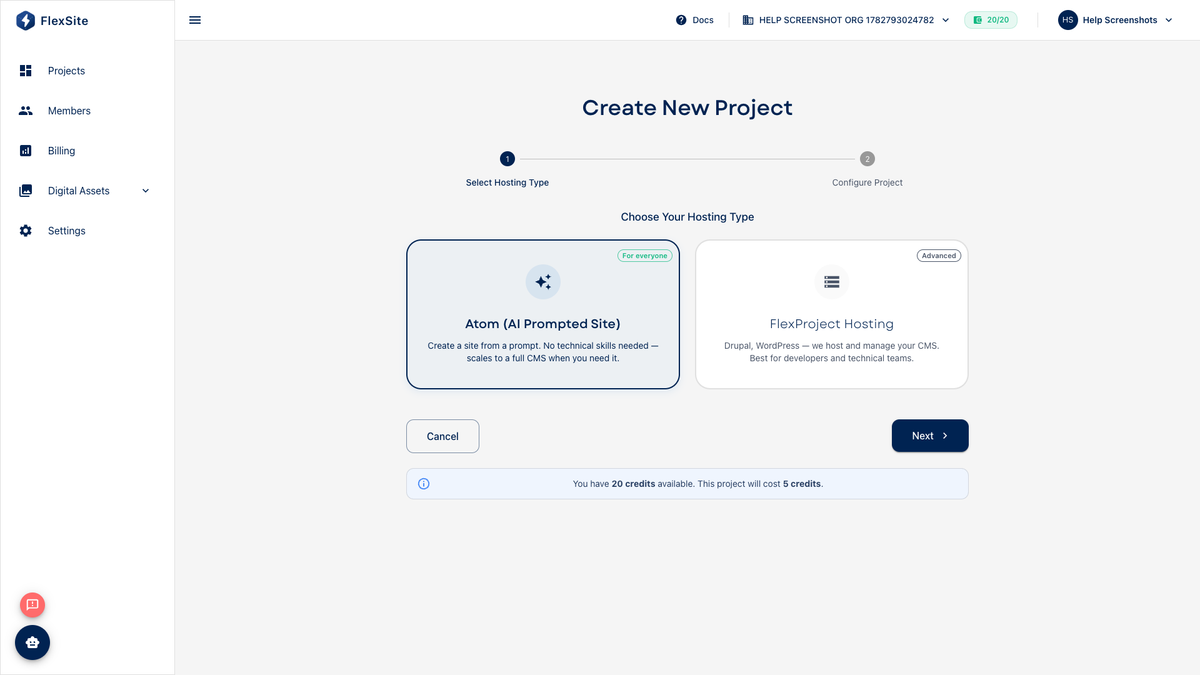
- Open Projects and click New Project.
- Step 1 — Hosting type: Atom for AI-generated sites, or FlexProject Hosting for Drupal-based Codeless / FlexLab.
- Step 2 — Project details: Enter a clear title (shown in the dashboard) and URL slug.
- Step 3 — CMS type (FlexProject only): Drupal CMS → Codeless dashboard workflow. Drupal 11 → can be Codeless blank or Flexlab with Git.
- Step 4 — Site template (Codeless): Choose Starter, Byte, Haven, or a marketplace pack that matches your use case.
- Step 5 — Theme (if shown): Pick a marketplace theme or accept the default bundled theme.
- Click Create Project and watch Overview until the environment is ready.
What you get after each tier
- Atom — AI-built site, single environment, refinement chat on Overview.
- Codeless — full Drupal admin via Quick Login, multiple Environments, Themes, Backups.
- FlexLab — GitLab repository on the Code tab, deployments via pipelines, Automation scripts.
You can also start Atom from Create Atom Site on Projects without walking through every wizard step.