
Build Settings
Applies to: FlexLab
Overview
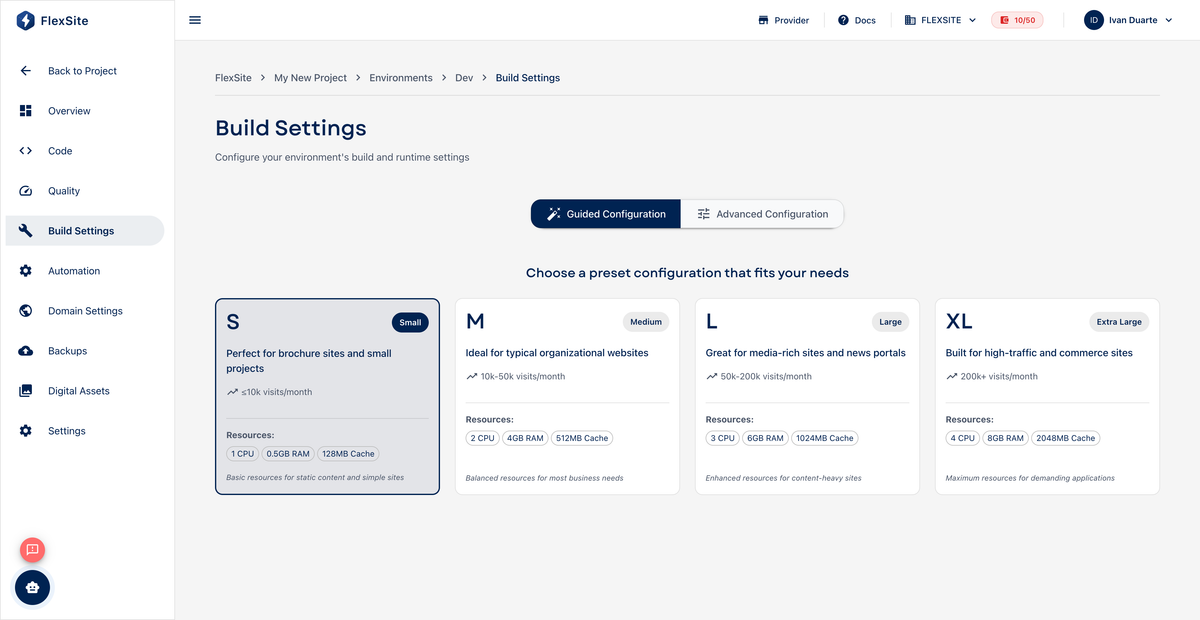
FlexLab uses the same Build Settings screen as Codeless to size each environment’s server (CPU, memory, cache). Pipeline builds produce your code artifact; Build Settings define how powerful the live environment is when serving traffic.
Key concepts
- CPU / RAM — processing power and memory for PHP and Drupal. Increase if pages feel slow under load.
- Varnish / Redis — caching layers that speed up repeat page views (especially important on production).
- Credit impact — raising sliders usually increases monthly credit usage; check the estimate before saving.
Steps
- Open Environments, select an environment, then Build Settings.
- Review current sliders and the credit delta shown in the UI.
- Adjust values modestly; production often needs more than a dev copy.
- Save and redeploy if the UI indicates a restart is required.
Pipelines vs runtime
GitLab pipeline runners build your code separately from the web server. Still, production environments need enough RAM/CPU for Composer-heavy deploy steps and peak visitor traffic — scale Build Settings after launch if Quality reports lag.
Review Billing → Usage after changing production resources.