
Creating a FlexLab Project
Applies to: FlexLab
Overview
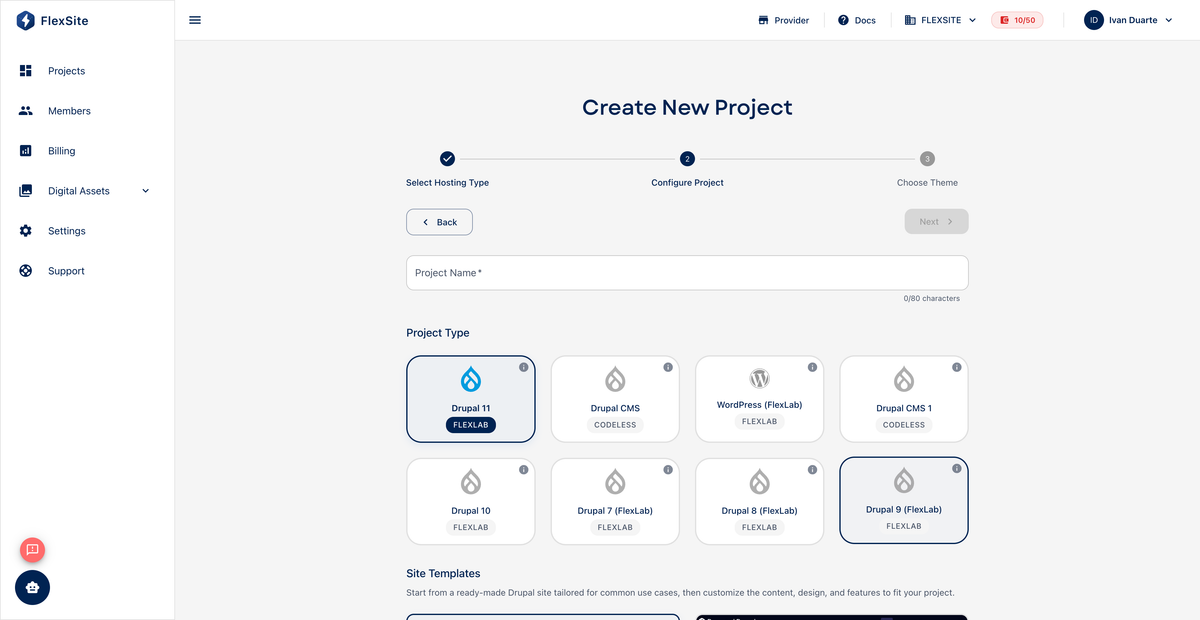
Creating a FlexLab project tells FlexSite to provision a new GitLab repository (your codebase), wire up deployment pipelines, and create a first environment where the site will run when code is pushed.
Key concepts
- GitLab repository — cloud storage for your site’s source code with full change history.
- Blank template — minimal Drupal 11 starter most agencies use before adding custom modules and themes.
- Pipeline — automated jobs that build and deploy the site after each push (starts automatically on first commit).
- Personal access token — a secure password for the FlexSite CLI and API (created under Profile → Tokens).
Steps
- From Projects, click New Project.
- Select FlexProject Hosting (not Atom).
- Choose Drupal 11 with the Flexlab label.
- Enter a title (dashboard name) and URL slug.
- Select Blank site template unless your team uses a custom agency starter.
- On the theme step, either pick a starter marketplace theme or Create Project with Default Theme if your theme will live entirely in Git.
- Optionally expand Advanced Settings for local development flags (Lando/DDEV) if your team uses them.
- Click Create Project and wait for the first pipeline to finish.
After creation
- Open Code and copy the clone URL for developers.
- Watch the initial pipeline in GitLab (linked from Code) — first deploy can take several minutes.
- When deploy succeeds, open Environments and confirm the environment card shows ready.
Developers should create a token on Profile → Tokens before running flexsite auth login.