
Editing and Refining Your Atom Site
Applies to: Atom
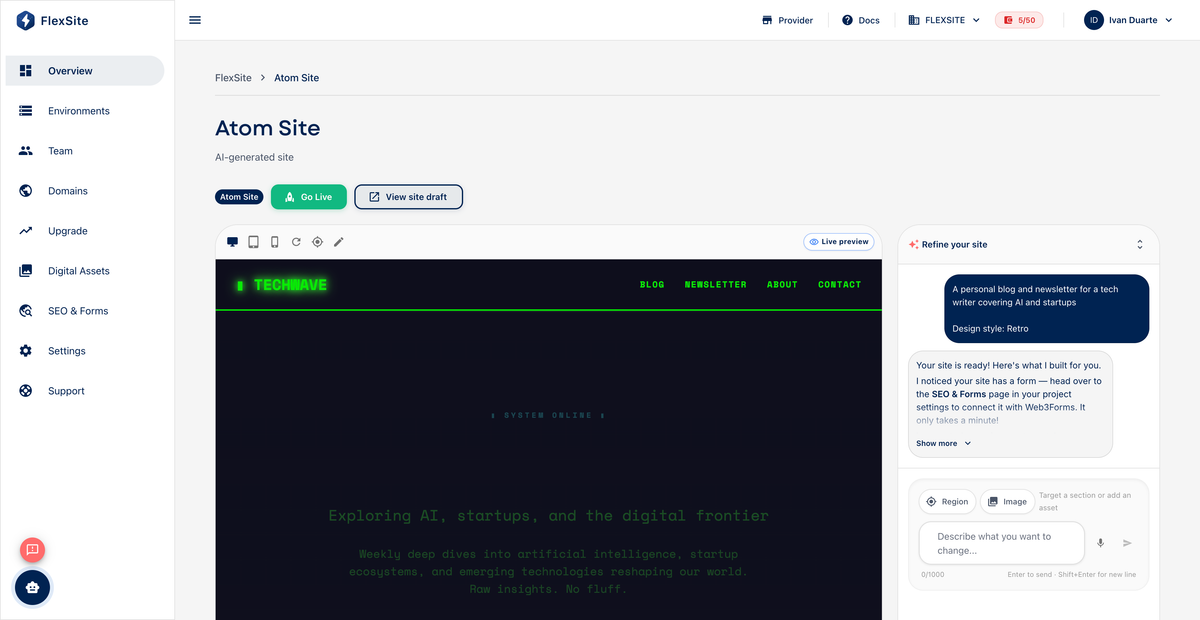
Overview
After Atom creates your site, you improve it through a chat-style builder on Overview — describe changes in everyday language and preview results before accepting. You do not use Drupal admin on Atom.
Key concepts
- Refinement — one round of AI edits from your instruction (“add a testimonials section,” “change headline to Welcome”).
- Preview — embedded frame showing the site with proposed changes before they go live.
- Accept — saves the version visitors will see and adds an entry to Version History.
What AI handles well
- Copy edits, color and spacing tweaks, adding simple sections (hero, features, FAQ).
- Reordering sections when you name them clearly.
- Generating placeholder text you can polish later.
What usually requires upgrade to Codeless
- Complex custom modules, member-only areas, intricate editorial workflows.
- Multiple environments (separate staging vs live copies).
- Theme Marketplace control and fine-grained Drupal layouts.
Steps — refine your site
- Open Overview.
- Open the site builder / refinement chat panel.
- Write one clear change per prompt when possible — smaller requests succeed more often than ten changes at once.
- Submit and wait for the preview to refresh.
- Review desktop layout; scroll the full page.
- Accept if satisfied, or prompt again with corrections (“make the CTA button green, not red”).
Example prompts
- “Replace the hero headline with ‘Summer classes now open’ and add a short subheading about registration.”
- “Add a three-column features section below the hero with icons for speed, security, and support.”
- “Change footer background to dark gray and make link text white.”
Version history
Each accepted refinement creates a restorable version — see Version History and Restore before large experiments.
Limits
- TRIAL orgs have small credit pools — excessive back-and-forth may consume resources; plan upgrades before major redesign sprints.
- FROZEN billing blocks refinements until ACTIVE again.