
Upgrading Atom to Codeless
Applies to: Atom
Overview
Upgrade to Codeless migrates your Atom site into a full Drupal CMS project with Quick Login, multiple environments, Themes, Backups, and editorial workflows your marketing team can grow into. It is a one-way product change — not a reversible toggle.
What changes for your team
| Before (Atom) | After (Codeless) |
|---|---|
| AI chat refinements on Overview | Drupal admin screens via Quick Login |
| Single site copy | Multiple environments (staging + live) |
| SEO & Forms on sidebar | Full Drupal modules and Theme Marketplace |
| Atom Version history | Drupal revisions + Backups |
URLs may change during migration — plan DNS cutover with Domains after upgrade.
Prerequisites
- Project owner or admin.
- Enough credits for Codeless provisioning.
- Team readiness to learn Drupal basics (or agency support).
Steps
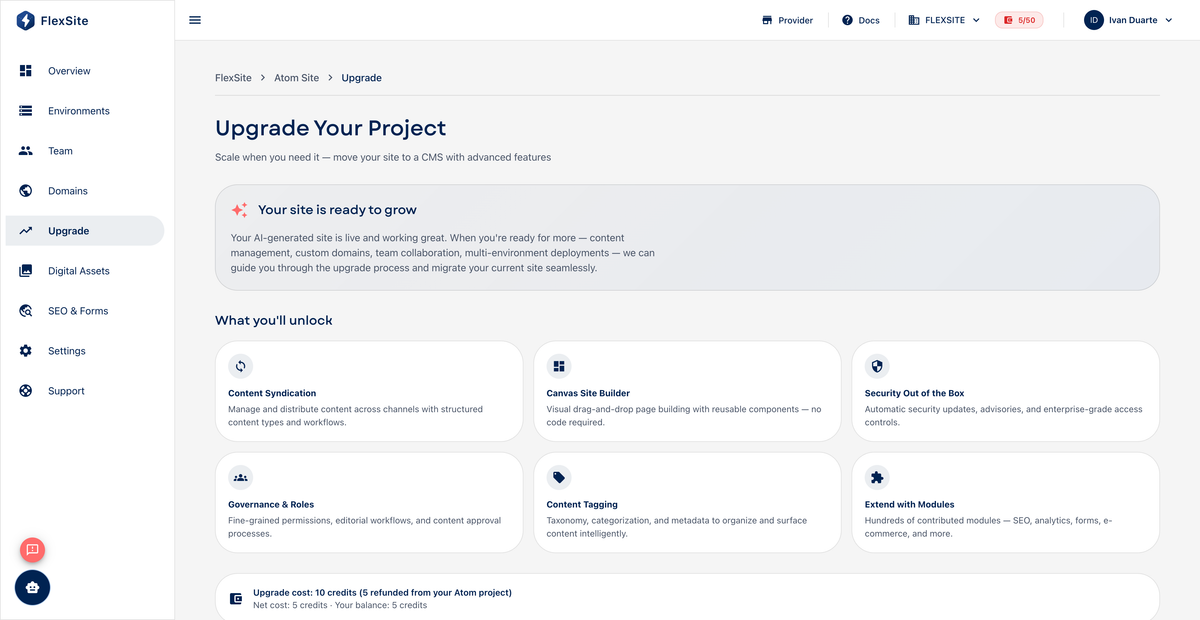
- Open Upgrade in the project sidebar.
- Read the comparison table — confirm you need environments, themes, or modules Atom cannot provide.
- Click Upgrade or Start upgrade.
- Wait for migration provisioning (may take several minutes). Do not delete the Atom project mid-migration.
- When complete, sidebar shows Environments, Themes, Backups.
After upgrade
- Use Quick Login on Overview to explore Drupal admin.
- Reconnect Digital Assets via Connect to Site if you use shared media.
- Re-run Domains / publication wizard if hostnames changed.
- Train editors on Drupal workflows — AI refinement panel is no longer available.
Schedule upgrade during a low-traffic window and communicate URL changes to stakeholders.