
SEO and Contact Forms (Atom)
Applies to: Atom
Overview
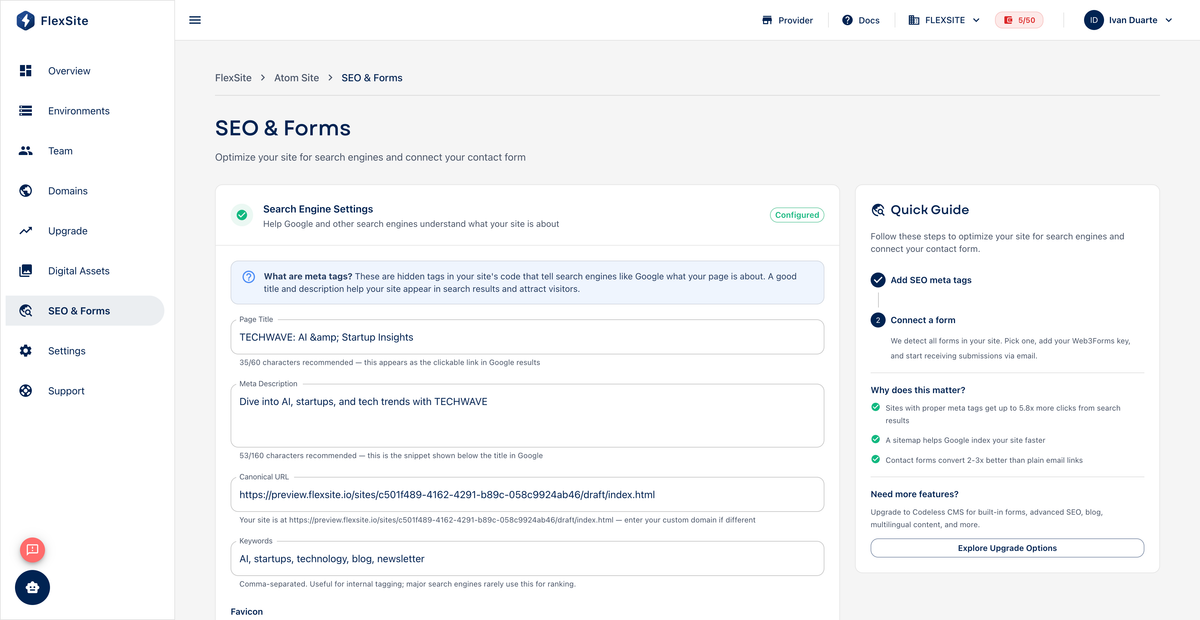
SEO & Forms on Atom projects lets you set how your site appears in Google results and configure a simple contact form — without opening Drupal admin. These settings affect how strangers discover and reach you.
Key concepts
- SEO — search engine optimization; basics include page title, meta description, and preview image when links are shared on social media.
- Site title — often appears in the browser tab and search results.
- Meta description — short summary under your link in Google (write for humans, not keyword stuffing).
- Robots / noindex — tells search engines not to list a page; useful for temporary previews, not for your main marketing launch.
- Contact form — visitors submit messages; you receive email at the address you configure.
SEO steps
- Open SEO & Forms in the project sidebar.
- Set site title to your brand plus primary offer (e.g. “Acme Consulting — Operations Strategy”).
- Write a meta description in one or two sentences describing who you help.
- Upload or select a social preview image if the field is available — this appears when links are shared on LinkedIn or Slack.
- Enable noindex only if you intentionally hide the site from search (rare on production).
- Save. Changes apply on the next publish cycle — refresh the public URL to verify.
Contact form steps
- On the same page, enable the contact form section.
- Set recipient email — a shared inbox like
hello@yourcompany.comworks well. - Customize the success message visitors see after submitting (“Thanks — we reply within one business day”).
- Open the live site URL from Overview and send a test message.
- Check spam folders if the test does not arrive within a few minutes.
Upgrade note
Advanced SEO (structured data, redirect rules, module-based metadata) requires Upgrade to Codeless for full Drupal SEO tooling.